
C#.Net对象内存模型及堆/栈数据结构详解 (三)
C# Heap(ing) Vs Stack(ing) in .NET: Part III
本文转载http://www.c-sharpcorner.com
Even though with the .NET framework we don''t have to actively worry about memory management and garbage collection (GC), we still have to keep memory management and GC in mind in order to optimize the performance of our applications. Also, having a basic understanding of how memory management works will help explain the behavior of the variables we work with in every program we write. In this article we''ll cover an issue that arises from having reference variables in the heap and how to fix it using ICloneable.
A Copy Is Not A Copy.
To clearly define the problem, let''s examine what happens when there is a value type on the heap versus having a reference type on the heap. First we''ll look at the value type. Take the following class and struct. We have a Dude class which contains a Name element and two Shoe(s). We have a CopyDude() method to make it easier to make new Dudes.
public struct Shoe{
public string Color;
}
public class Dude
{
public string Name;
public Shoe RightShoe;
public Shoe LeftShoe;
public Dude CopyDude()
{
Dude newPerson = new Dude();
newPerson.Name = Name;
newPerson.LeftShoe = LeftShoe;
newPerson.RightShoe = RightShoe;
return newPerson;
}
public override string ToString()
{
return (Name + " : Dude!, I have a " + RightShoe.Color +
" shoe on my right foot, and a " +
LeftShoe.Color + " on my left foot.");
}
}
Our Dude class is a variable type and because the Shoe struct is a member element of the class they both end up on the heap.
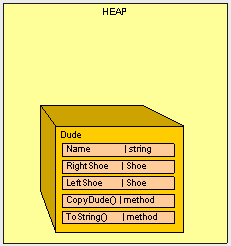
When we run the following method:
public static void Main()
{
Class1 pgm = new Class1();
Dude Bill = new Dude();
Bill.Name = "Bill";
Bill.LeftShoe = new Shoe();
Bill.RightShoe = new Shoe();
Bill.LeftShoe.Color = Bill.RightShoe.Color = "Blue";
Dude Ted = Bill.CopyDude();
Ted.Name = "Ted";
Ted.LeftShoe.Color = Ted.RightShoe.Color = "Red";
Console.WriteLine(Bill.ToString());
Console.WriteLine(Ted.ToString());
}
We get the expected output:
Bill : Dude!, I have a Blue shoe on my right foot, and a Blue on my left foot.
Ted : Dude!, I have a Red shoe on my right foot, and a Red on my left foot.
What happens if we make the Shoe a reference type? Herein lies the problem. If we change the Shoe to a reference type as follows:
public class Shoe{
public string Color;
}
and run the exact same code in Main(), look how our input changes:
Bill : Dude!, I have a Red shoe on my right foot, and a Red on my left foot
Ted : Dude!, I have a Red shoe on my right foot, and a Red on my left foot
The Red shoe is on the other foot. This is clearly an error. Do you see why it''s happening? Here''s what we end up with in the heap.
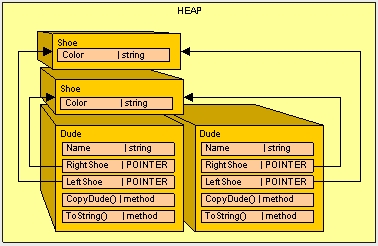
Because we now are using Shoe as a reference type instead of a value type and when the contents of a reference type are copied only the pointer is copied (not the actual object being pointed to), we have to do some extra work to make our Shoe reference type behave more like a value type.
Luckily, we have an interface that will help us out: ICloneable. This interface is basically a contract that all Dudes will agree to and defines how a reference type is duplicated in order to avoid our "shoe sharing" error. All of our classes that need to be "cloned" should use the ICloneable interface, including the Shoe class.
ICloneable consists of one method: Clone()
public object Clone()
{
}
Here''s how we''ll implement it in the Shoe class:
public class Shoe : ICloneable
{
public string Color;
#region ICloneable Members
public object Clone()
{
Shoe newShoe = new Shoe();
newShoe.Color = Color.Clone() as string;
return newShoe;
}
#endregion
}
Inside the Cone() method, we just make a new Shoe, clone all the reference types and copy all the value types and return the new object. You probably noticed that the string class already implements ICloneable so we can call Color.Clone(). Because Clone() returns a reference to an object, we have to "retype" the reference before we can set the Color of the shoe.
Next, in our CopyDude() method we need to clone the shoes instead of copying them
public Dude CopyDude()
{
Dude newPerson = new Dude();
newPerson.Name = Name;
newPerson.LeftShoe = LeftShoe.Clone() as Shoe;
newPerson.RightShoe = RightShoe.Clone() as Shoe;
return newPerson;
}
Now, when we run main:
public static void Main()
{
Class1 pgm = new Class1();
Dude Bill = new Dude();
Bill.Name = "Bill";
Bill.LeftShoe = new Shoe();
Bill.RightShoe = new Shoe();
Bill.LeftShoe.Color = Bill.RightShoe.Color = "Blue";
Dude Ted = Bill.CopyDude();
Ted.Name = "Ted";
Ted.LeftShoe.Color = Ted.RightShoe.Color = "Red";
Console.WriteLine(Bill.ToString());
Console.WriteLine(Ted.ToString());
}
We get:
Bill : Dude!, I have a Blue shoe on my right foot, and a Blue on my left foot
Ted : Dude!, I have a Red shoe on my right foot, and a Red on my left foot
Which is what we want.
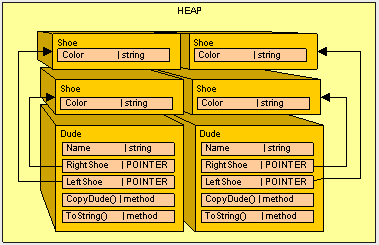
Wrapping Things Up.
So as a general practice, we want to always clone reference types and copy value types. (It will reduce the amount of aspirin you will have to purchase to manage the headaches you get debugging these kinds of errors.)
So in the spirit of headache reduction, let''s take it one step further and clean up the Dude class to implement ICloneable instead of using the CopyDude() method.
public class Dude: ICloneable
{
public string Name;
public Shoe RightShoe;
public Shoe LeftShoe;
public override string ToString()
{
return (Name + " : Dude!, I have a " + RightShoe.Color +
" shoe on my right foot, and a " +
LeftShoe.Color + " on my left foot.");
}
#region ICloneable Members
public object Clone()
{
Dude newPerson = new Dude();
newPerson.Name = Name.Clone() as string;
newPerson.LeftShoe = LeftShoe.Clone() as Shoe;
newPerson.RightShoe = RightShoe.Clone() as Shoe;
return newPerson;
}
#endregion
}
And we''ll change the Main() method to use Dude.Clone()
public static void Main()
{
Class1 pgm = new Class1();
Dude Bill = new Dude();
Bill.Name = "Bill";
Bill.LeftShoe = new Shoe();
Bill.RightShoe = new Shoe();
Bill.LeftShoe.Color = Bill.RightShoe.Color = "Blue";
Dude Ted = Bill.Clone() as Dude;
Ted.Name = "Ted";
Ted.LeftShoe.Color = Ted.RightShoe.Color = "Red";
Console.WriteLine(Bill.ToString());
Console.WriteLine(Ted.ToString());
}
And our final output is:
Bill : Dude!, I have a Blue shoe on my right foot, and a Blue on my left foot.
Ted : Dude!, I have a Red shoe on my right foot, and a Red on my left foot.
So all is well.
Something interesting to note is that the assignment operator (the "=" sign) for the System.String class actually clones the string so you don''t have to worry about duplicate references. However you do have to watch our for memory bloating. If you look back at the diagrams, because the string is a reference type it really should be a pointer to another object in the heap, but for simplicity''s sake, it''s shown as a value type.
In Conclusion.
As a general practice, if we plan on ever copying of our objects, we should implement (and use) ICloneable. This enables our reference types to somewhat mimic the behavior of a value type. As you can see, it is very important to keep track of what type of variable we are dealing with because of differences in how the memory is allocated for value types and reference types.
In the next article, we''ll look at a way to reduce our code "footprint" in memory.
本文来源: